

You know when the sale shows on the offer page, but never lands in the network panel? In one real case, the panel said 64 sign-ups that day, but 65 sale notifications had come in.
That notification is called postback: it is the network pinging your panel every time a paid action happens. The SubID is the tag you stick on your link to know where each sale came from.
In this guide you learn how to wire the 2 together, test it without spending anything, and use the report to cut what does not pay.
Table of Contents
- 1 – What is postback and how it works
- 2 – What data the postback sends to the tracker
- 3 – What is SubID and what it tracks
- 4 – How to set up the postback in your tracker
- 5 – How to test the postback before scaling
- 6 – How the postback reveals lead shaving and fraud
- 7 – How to use SubID to optimize campaigns
- 8 – Frequently asked questions about postback
- 9 – Postback: the bottom line
- 10 – How we sourced this post
What is postback and how it works
It works like this: someone clicks, buys, and the network pings your tracker right away. The postback is that notification, and the tracker is the panel that logs every click you send.
- The visitor clicks the ad, and the tracker records a unique identifier, the
click_id - The tracker redirects the visitor to the offer page
- The visitor signs up, buys, or deposits, and the network records the action
- The network calls the tracker’s
postbackURL, carrying theclick_idand the action data - The tracker matches the
click_idto the original click and adds the conversion to the report
Without that notification, you miscount 20% to 30% of your leads. And if the stats arrive 2 hours late, you keep paying for clicks on a bad campaign without noticing. On push (the ad that lands as a phone notification), Google Analytics can lose up to 70% of the data.
| Item | Pixel | Postback |
|---|---|---|
| Where it runs | in the browser | between servers |
| Ad blocker | kills the event | no effect |
| JavaScript off | loses the conversion | no effect |
| Typical use | teaching the ad algorithm | affiliate stats |
The pixel is that piece of code running in the visitor’s browser. The problem is that it dies with the browser, so an ad blocker or disabled JavaScript swallows the conversion.
People call this route S2S, because it is one server talking to another server. If a delivery fails, the system retries until it gets through.
Facebook Ads and Google Ads also want this notification. When the conversion flows back to them, the algorithm learns who buys and the campaign aims better every day.
What data the postback sends to the tracker
Each notification carries half a dozen fields, and each field becomes a column in your report. The main one is the click_id, which says exactly which click produced that sale.
| Parameter | What it carries | Example |
|---|---|---|
| click_id | click identifier | k7f2m91a |
| payout | commission value | $50 |
| status | lead status | approved |
| campaign_id | source campaign | camp_07 |
| goal | type of paid action | deposit |
The network marks each lead as pending, approved, or rejected. An approved lead turns into money, and a rejected one dies. The pending one sits in hold (the network’s review queue), explained in the guide on the CPA hold period.
The goal shows which action happened: sign-up, deposit, or repeat purchase inside the same offer. For example, there are offers where the sign-up pays $2 and the repeat purchase pays $30.
The postback URL is your tracker’s domain plus a few fields at the end, like cid={clickid}&payout={payout}&status={status}. The network swaps each key for the real value at send time.
In global mode, you paste the URL once in your network account and that is it: every new offer is born wired. Per-offer mode is for when one offer pays different goals than another, so each one gets its own URL.
What is SubID and what it tracks
The SubID is a tag you stick on your affiliate link, and the network sends that tag back with the conversion, so the report shows where the money came from.
A tagged link looks like this: https://offer.com/?aff_id=123&sub_id=facebook_ad1. When someone buys through that link, the sale lands on the facebook_ad1 row of your report.
- The traffic source, like Facebook, Google, push, or a teaser network
- The campaign and the ad, each with its own tag
- The creative (the ad itself), to compare image against video
- The source site inside an ad network
- The device and the hour of the click
Most networks give you up to 5 fields, from sub1 to sub5, and the ad network fills several on its own. On push, for example, subid_1 receives the code of the site that produced each click.
These tags also work for testing pieces of the page itself. For example: you run 2 titles on the same landing page, each with its own tag, and the report shows which of the 2 titles sold more.
The postback brings each sale back, and the SubID tells where it came from. With the 2 together, the report becomes a map of your money: you see where it comes in and where it leaks.
How to set up the postback in your tracker
Wiring your tracker to a network takes about 10 to 15 minutes the first time. From the second time on, you spend about 2 minutes, because the saved template comes ready.
- Copy the
postbackURL in your tracker - Check the network’s documentation for the macros it accepts
- Paste the URL in the network’s
postbackfield, global or per offer - Send a test lead and check that it shows in the tracker
- Compare the network panel total with the tracker total
- Save the wiring as a template for the next offer
In Keitaro (one of the most used trackers), every known network has a ready template, and the click macro is called {subid}. On the network side, that value lands in the aff_click_id field.
In casino, the sign-up shows in the tracker as a lead. The deposit shows as a sale, already with value and currency. If your test does not show up in 30 minutes, talk to your manager.
| Tracker | Strong point |
|---|---|
| Keitaro | ready network templates |
| Binom | a log of every request |
| AdsBridge | cloud tracker |
| RedTrack | Telegram alerts |
If you do not want to babysit a server, a cloud tracker like AdsBridge solves it, and the account opens right in the browser. High-volume teams prefer a detailed log, because the log is the proof when the numbers do not match.
How to test the postback before scaling
Testing is simple: you click your own ad, complete the action, and check the 2 panels. Without this test, you only find the broken macro after the money is gone.
A small gap between the panels (1% to 2%) is normal, because each system closes the day in a different timezone. If the gap passes 5%, the usual cause is a wrong macro or a duplicated notification.
| Error | Symptom | Fix |
|---|---|---|
| URL with a space or accent | only clicks in the report | rebuild the URL |
| HTTP instead of HTTPS | the network refuses the call | switch the protocol |
| Macro with a wrong name | lost conversion | check the documentation |
| Postback in 2 places | conversion counted 2 times | keep 1 URL per offer |
| Skipped test | error found while paying | test lead first |
The tracker log keeps every notification that arrived, with the time and the values. With that history in hand, you find the field that came empty and end any argument with the network.
Run the test before spending your first dollar, and repeat it on every new offer. The log also shows problems far worse than a broken macro, like the case in the next section.
How the postback reveals lead shaving and fraud
The shave is the hidden trimming of leads: the panel shows fewer sales than the notifications that arrived. The tracker log is your witness, with the time and the click_id of every notification.
Look at what happened to an affiliate who had 12,000 sign-ups in a single casino. The deposits on that same account passed 1,000.
One morning, the traffic was normal, but the sign-ups vanished from the panel. He made a test sign-up, and it did not show either.
The final page had stopped recording the referral code, so players were coming in with no owner. And the network only returned the sign-ups he proved in writing, email by email.
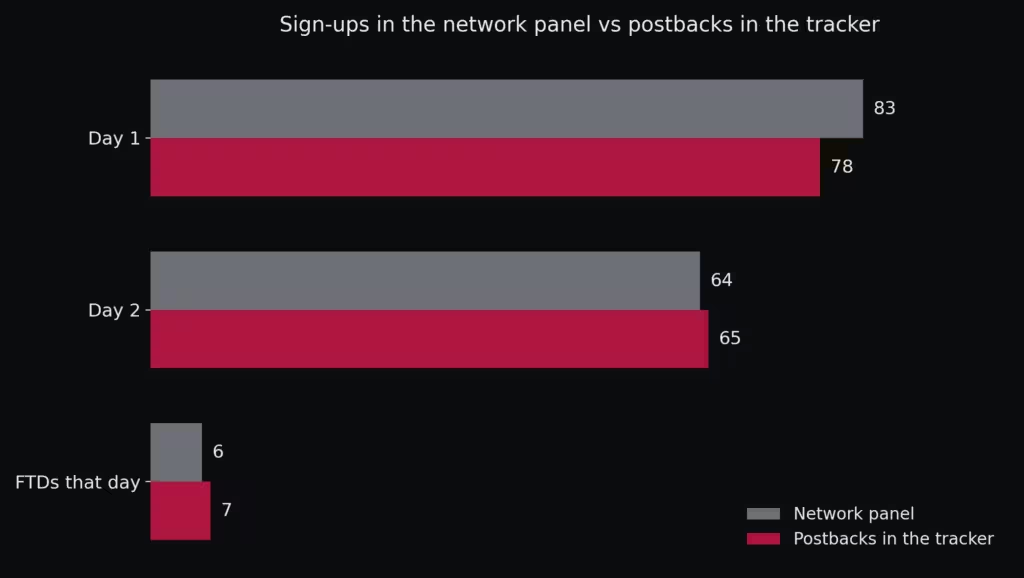
The numbers never matched: one day the panel showed 5 sign-ups with no postback at all, and the next day 1 postback more than the panel admitted.
A paid deposit showed up in the tracker log, but never appeared in the network panel. The network refused to compare the numbers side by side, and he stopped the traffic on the spot.
Fraud runs in the opposite direction, with too many clicks and too few actions. The tracker filter cuts 10% to 20% of fake leads without you doing anything.
- A conversion that lands seconds after the click smells like a bot, and the automatic rule rejects it
- A repeated IP with more than 5% rejection goes to the blacklist
- A click country different from the lead country kills the approval
- The cleanup saves 15% to 20% of the budget
At the end of the month, match the tracker against the panel, number by number. If the gap repeats every month, it is a talk with your manager or a change of network.
How to use SubID to optimize campaigns
With the report grouped by tag, you optimize in 5 minutes a day. You go line by line, cut what loses money, and raise the bid on what profits.
The per-site blacklist on push
This routine worked well in a cheap push case. A team ran a campaign with clicks at 0.05 rubles. Each click carried a tag with the site, the platform, and the campaign name.
- The
subid_1field received the identifier of the source site - The
subid_2marked phone or desktop - The
subid_3carried the campaign name
The first night brought 1,805 clicks. Then you measure site by site: if a site earned 2 rubles on 100 clicks, it is paying 0.02 rubles per click.
Their rule was simple: any site with more than 30 clicks earning under 0.08 rubles went to the blacklist. Cleaning that 2 times a day, the campaign turned positive on the 4th day.
The orders hiding in the comments
There was also a case in Oman, where $3,735 in ads turned into $11,778 in revenue. The secret was in the tags: one for each account, one for each ad and one for the order source.
- Each ad account carried its own tag, from ra1 to ra10
- Each ad carried its own, from ad1 to ad10
- An order born in a comment carried the comment tag
In the end the team kept $8,043 of clean profit (11,778 minus 3,735), with 967 approved leads.
The comment tag revealed a surprise: 20% to 30% of the orders came from the ad comments, with the same approval rate (the share of orders the network accepts) as the site. The team started answering comments on the spot, because the orders were sitting right there.
A campaign without tags becomes a black box
Now comes the example of the mistake. In a test during the 2026 world cup, a team put 24,000 rubles into media, and one of the scenarios went live without full tagging.
- The search ad logged 2,667 clicks
- The bookmaker site counted close to 2,900 visits
- Conversions stopped at 8, with no known owner
- 8,400 rubles spent on that scenario
- 8 conversions in total
- 1,050 rubles paid per conversion
Nobody could say which keyword or ad brought the money, so the team had no idea what to scale.
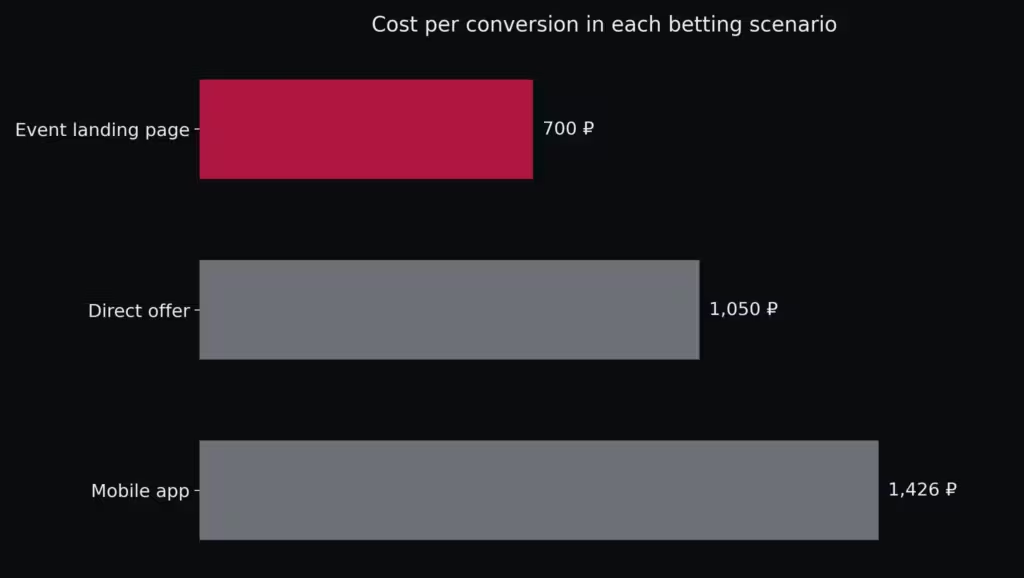
The event landing page had its tags in place and closed at 700 rubles per conversion. The lesson the team took was clear: first the tag, then the budget.
- One tag per creative version
- About 100 clicks on each version before deciding
- The loser gets cut and the winner keeps the budget
For creatives, the recipe is the same. The ruler for cutting or scaling is in the CR, EPC and ROI guide: CR is the conversion rate, EPC is the earnings per click and ROI is the return on your spend.
Frequently asked questions about postback
What is postback in affiliate marketing?
In affiliate marketing, postback is the server call the network fires to your tracker when a click turns into a paid action. The stats update in real time, with no spreadsheet.
What is the difference between postback and pixel?
The pixel runs in the visitor’s browser and loses events when an ad blocker steps in. The postback travels from server to server and arrives whole.
What does S2S mean?
S2S stands for server to server, the route the postback travels. Nothing in the visitor’s browser can break that delivery.
What is SubID and what is it for?
SubID is the extra parameter on your affiliate link that marks where the click came from. With it, the report shows which ad, site or creative brought each conversion.
How many SubID fields does a network accept?
Most networks give up to 5 fields, from sub1 to sub5. The ad network fills part of them on its own.
How do I test if the postback works?
Click your own ad, complete the action on the offer, and check the lead in the 2 panels. The test conversion usually shows in minutes, and 30 minutes with no signal points to a wiring error.
What gap between the panels is normal?
Between 1% and 2%, because each system closes the day in a different timezone. Above 5%, look for a wrong macro or a duplicated notification.
Does postback work without a tracker?
It works, because the network can notify the ad platform directly. Without the tracker, you lose the log and the per-site reading.
What is a global postback?
It is the single URL pasted in your network account, and it covers every new offer. The per-offer version uses its own URL when the goals change.
Why did more postbacks arrive than leads in the panel?
It happens when the final page stops recording the referral code and the lead comes in with no owner. Ask for a click_id check and keep the log, because a repeating gap means shaving.
Postback: the bottom line
At the end of the day it is simple: the postback returns every sale in real time, and the SubID says where it came from. With the pair running, every report row has an owner.
- Wire the
postbackbefore your first dollar of media - Test with 1 lead and compare the 2 panels
- Tag site, ad, and creative from the first click
- Cut by report row, with the earnings-per-click ruler
- Match the panel against the log by
click_idat every closing
Once your rows are clean, the next step is the guide on how to scale CPA campaigns without losing grip on cost.
In the casino case, the network also disappeared for 5 hours of maintenance without a word. The one who told that story was the log.
How we sourced this post
The numbers come from public offers and case reports in the niche, checked in September 2026. Each offer’s terms come from the networks’ own materials.
Commission, hold, and approval rates change without notice, and the catalog turns over every week. Check the offer in the dashboard before putting money on media.
Our fact-checking process is on the About CPA RAW page, and the other guides in this series follow the same method.
Spotted an outdated number? Let us know through the contact page.
This post is informational and not financial advice. Media buying carries risk: you pay for the traffic before you know whether it converts.

Leave a Comment